| Communicator
Reviews: SmallBase vs. PowerData |
|
SmallBase 2.61 vs. PowerData 1.5
Review of databases for the Nokia 9210 by Arild
Bergh
[First impressions][Create
table][Import data][Add/Edit
records][Find/Sort data][Display
data][Reporting][Export
Data][Other features][Summary]
One of the great things about the 9210 for an information freak
like myself is that your data can be always available. However the
9210 only ships with a fixed address and calendar database, so for
any other data you need 3rd party products. These two programs from
Corisoft and Epocware
will let you enter, manipulate, view and share data on your 9210.
However, the very names they have indicate differences which becomes
apparent as you use the programs. To test them I went through the
most common tasks connected with data management.
First impressions [top]
The advantage of the well defined Symbian GUI is apparent, both
programs are easy to get around with familiar buttons and dialog
boxes. When first opened the programs will reopen the file which
were last open. PowerData has tooltips like many Windows applications
and good online help, whereas SmallBase
has none, which is a big drawback as it has lots of features. PowerData
is using 68 kb memory and SmallBase 96 kb, with some data the figures
were 100 kb and 160 kb respectively. This is good news with the
limited memory available on the 9210.
Neither database is relational although you can have multiple tables
in each file. Whether relational data is required on a small communicator
is debatable, but a simple lookup facility would be great (i.e.
two tables would be linked on a specified field, and in table 2
only records matching the current field in table 1 would be displayed).
Task 1: Create table [top]
SmallBase:

Both packages use a standard Symbian dialog box to define fields
in a table, but SmallBase is far richer in the options that's on
offer. Whereas PowerData will allow text, number, date and Yes/No
fields, SmallBase also offers memo, duration, choice list, telephone
number, formula, file links and folder links. You can also specify
the look and size of the fields in cardview, grid layout and reports.
So for SmallBase it's really field definition and display design
at the same time, a solution which work really well once you grasp
it.
PowerData:
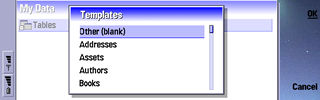
PowerData has a very good selection of templates for tables, such
as addresses, expenses, customers and even flowers, a great time-saver.
The program also allows you to modify the field type after a table
is created, something that is not possible with SmallBase
Task 2: Import data [top]
On a device like the 9210 where data entry is relatively slow,
importing data from a external (PC made) file is a must. Both programs
import DBF (dBase) compatible files as well as delimited text files.
With this you should be able to import data from more or less any
database in the world.
A minor irritation with both packages is that despite having defined
my default data directory to be on the memory card they insist on
displaying the file open box of the internal memory, no matter how
many times I open files from the MMC card.
First I tried to import a DBF file (in dBase IV format) with 237
records and 54 fields with. Both programs will create a new table
based on the information in the DBF file. In this area PowerData
outclasses SmallBase on speed with a time of 6 seconds vs 50 seconds.
However PowerData totally ignored the memo fields (which in DBF
files are kept in a physically separate file) whereas SmallBase
created the fields in the database, but didn't carry across the
contents, which seems to be a bug. PowerData also allows you to
select which fields to import as well as to change the data type
on a field before importing.
PowerData:
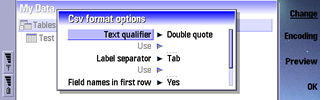
Next test was a 1030 record, 3 field delimited text file. Here
PowerData took 4 seconds and SmallBase used data 1 minute 35 seconds!
PowerData will create a new table structure from the information
found, and you can set the data type for each field before importing.
SmallBase on the other hand requires a table to be created first
which is tedious (and puzzling as importing from DBF files results
in new tables being created).
Task 3: Add/Edit records [top]
This task is similar in both programs, a simple list of fields
in a single column is displayed, and you move between using the
arrow button. SmallBase allows access to all the menus whilst doing
this, in PowerData this is not possible.
Task 4: Find/Sort data [top]
In most database programs there are two ways of looking up records:
Do a search and the first record matching the condition will be
displayed or to define a filter which will only display records
that fits a specified criteria.
In both applications find works for all fields or for a specified
field. SmallBase only allows a find in text fields, in PowerData
any field can be used. PowerData also has an update facility where
which update a field with a new value (no maths allowed unfortunately),
either in the entire table or in the current set of filtered records.
I would have liked to see a confirmation dialog box though when
the whole file is updated, I had suddenly turned everyone's name
into Smith and there was no undo...
PowerData:
SmallBase:
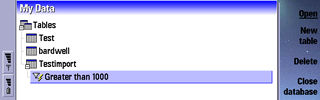
Speedwise PowerData is the fastest by far when it comes to filter
records. It also keeps a list of saved filters below the table names
in the list of tables. This means you can have a big address list
filtered by different towns and treat each town as a separate table
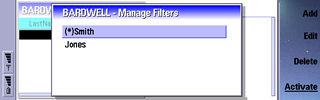
by opening the filtered version of the table. SmallBase also allow
saved filters, but it is more cumbersome with individual filters
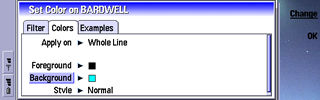
having to be activated or deactivated. A neat touch however is that
you can create filters with colours, for instance display all records
with the name Smith in Green, or all negative amounts in red.
SmallBase:
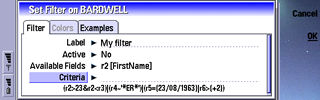
In PowerData you can create filters based on a range of criteria
which is different for different field types. It also allows the
use of SQL queries (standard query language as used by most big
database systems), which is very handy if you're working on a copy
of corporate data as you can probably get the queries pre-defined..
SmallBase:
SmallBase has it's own query language, a bit daunting at first,
but very flexible, working very well with all the different field
types on offer in the program. You can have a time field that is
2 hours greater than x etc.
Both programs will let you sort data on any field, either through
a index for a field, or simply on the spot. In PowerData this is
done via a menu, whereas SmallBase does this via a shortcut key
(Ctrl + Left Arrow), this I discovered by accident and it highlights
the problems of not having a help file
Task 5: Display data [top]
SmallBase:
PowerData:
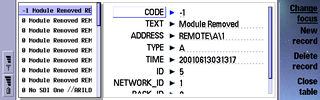
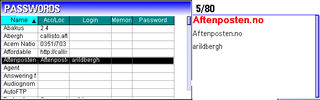
In this area there's no doubt that SmallBase has the upper hand.
You can define fonts and colours for individual field, the size
to use for display and when adding data. In PowerData there's just
a global font that can be selected. Both applications can switch
between a grid only view or grid next to a card view of the current
record. SmallBase will allow you to zoom in/out both in the grid
and in the cardview but in PowerData the cardview size is fixed,
this is very irritating.
PowerData uses a truncated version of the grid in card view mode,
whereby each line has the fields listed with a single space between
them. The thought is nice in that you can see more data, but it
makes it harder to read the data. SmallBase's solution of letting
you define column width work better I feel.
PowerData will let you create filters where you can hide individual
columns, in SmallBase this is done when you create the tables, so
there's more options for PowerData.
Task 6: Reporting [top]
Although SmallBase has a report tab I found no way of creating/running
reports. Future developments? It does however allow you to sum a
selection of data, using the card view to show the total for all
numeric field. PowerData has simple reporting facilities which can
group on identical fields and generate a grid with sum, average,
minimum of maximum values for selected fields. Reports are also
saveable, and will be displayed in the table list, giving yet another
view on your data. In either case it's not very comprehensive and
could do with some more features.
Task 7: Export Data [top]
PowerData does CSV, DBF, TXT and HTML formats, and SmallBase does
CSV and HTML. Both allows you to select delimiters for the CSV files.
Once again there's a big speed difference, SmallBase used 13 seconds
and PowerData 1 on a table of 200+ records. SmallBase does allow
you to export all records or the selection at the time of export
whereas PowerData exports whatever is currently listed.
Other features [top]
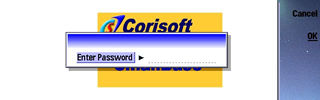
Both programs allows you to password protect files, so you can
use them as an alternative to the many programs out there which
offers to keep pin numbers, passwords and login details safe from
preying eyes.
SmallBase can be used to dial phone numbers using the telephone
number field type, you can also start files or browse folder. This
means you can develop fairly complex applications using SmallBase.
PowerData will let you copy the current record to the clipboard,
a useful feature I always find, something that's not possible in
SmallBase SmallBase provides a link facility to jump from one record
to one or more records in another table, but the link is manual
and fairly clumsy implemented.
It's worth noting that despite the odd crash or reset (ahh, the
9210 is temperamental sometimes...) I never lost any data in either
program, very impressive!
Summary [top]
As I said in the beginning, the names really do indicate the differences
between the programs. An ideal database would combine PowerData's
speed and user interface with SmallBase's versatile fields and display
possibilities (and throw in data synch with the PC for good measure).
Until such a time it's clear that PowerData wins when it comes to
speed and stability, and would be the natural choice for big tables
of simple data. If your requirements are for smaller datasets (a
few hundred records) and a good display of the data is important
or you need to develop feature rich applications, then SmallBase
is the choice.
PowerData retails at $ 19.95 (about 14.30 pounds), SmallBase costs
20 pounds ($ 27) , discounted to 15 pounds ($20.95) in January.
Thanks to Arild for the excellent review!
Websites:
|


 Copyright
(©) Rafe Blandford
2000-2001 | Last modified: January 20 2002.
Copyright
(©) Rafe Blandford
2000-2001 | Last modified: January 20 2002. 

