| Rafe's Review
of eBook Reader for the Nokia 9210 |
|
Part One of the Review |
Reviews Home | Communicator Home
In the second part of this review I concentrate on the most important
part of the program - the actual Reader itself. While most programs
offer only this function eBookReader offers other, but does this
let down the reader? Not at all. This is the best eBook Reader I
have used anywhere. There are a few feature it might have, but overall
it has more than any other reader I've used.

The reader has a book mark feature that works very
well. Bookmarks can be used to quickly and easily navigate around
long documents. For example you could set them up so there was one
at the beginning of each chapter.

Bookmarks can be added by using the appropriate menu
entry or pressing Shift+Control+A. The programs guesses what you
will want to call the bookmark and its quite intelligent about it
, here we can see that the appropriate text has been selected without
any action on my part.

You can then use Ctrl+B to bring up a list of bookmarks which you
can then select using the arrow keys and then use return to jump
to that bookmarks. You are also able to rename and delete the bookmarks
from this screen. Bookmarks are a powerful feature of reading long
documents and they are often overlooked but here they have been
implemented extremely well.

The View menu shows the true power of this program.
Some of the options include selecting font and formatting, justified
alignment, zooming, line spacing and more.

The Font dialog is particularly powerful and you can choose to
view the text in any of the fonts on your Communicator. You can
choose the font size and the formatting as well as the colour and
several other options (some of which seem a little too much).

In the example above the justified alignment is switched
on and the font is Arial in blue. Whatever you find most comfortable
to read can be set up. If you use a font on your PC that you find
particularly comfortable for reading you should be able to transfer
it to your 9210 and use it here.
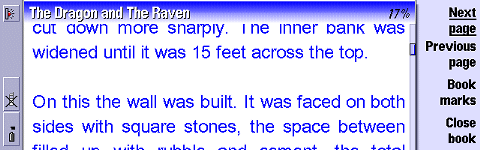
If you want to make the text bigger you can either
choose to use a larger font size but more conveniently you can use
the zoom key. Perfect for when you are tired at night and you want
the text to be that little bit bigger.

There is also an excellent full screen mode which
on the 9210 with its relatively small screen is very welcome. The
screen of the 9210 is excellent for reading eBooks because it is
very sharp and clear, but also because the pixels per inch are higher
than on most desktop monitors. This means that when reading eBooks
on the 9210 there should be very little eye strain.

While in full screen mode the command buttons still
work to allow easy navigation of the pages (the command button area
pops up after clicking so you can see which each one is). In this
shot the top titlebar has been turned on.

Also included in a find tool as well as the option
to select all and copy. This means you can copy the text out of
a eBook file. Since many of the DOC files available are small reference
files this is more useful that it might appear. The Go Menu contains
the navigation tools which can be used to go to the next page, the
previous page, the beginning or end of the file, or a certain %
ot the way through it. However I found myself using the Command
Buttons for navigation. The navigation system certainly works -
it speedy and nice and easy to get at, and while you do not have
to turn a page you could consider clicking the button the equivalent.


In the final two screenshots you can see examples
of the thought that have gone into the program. A recent file option
is provided on the menu to allow quick access to previously read
file. Also if you click on the an eBook files in the File Manager
it will start the program and open the book at the last viewed page
thanks to the file recognisers that are installed with the program.
There are a few thing I would like to see added to
eBook Reader, but this is a version 1.20 release and as such it
is well featured and polished. It be nice to have an option to have
the text display vertically across the screen (i.e. so you could
read it like a book). It also be nice to see other formats supported
- perhaps text could be added?
eBook Reader is a very impressive program, it is fast
and easy to use, it doesn't just let you read eBooks, but manage
and store them too. It is the best Reader I have ever used (including
those on the PC). It is good value at $19, and the shareware system
means you can try it free for 30 days. It has the well known Epocware
behind it guaranteeing good support (an example of which is a bug
fix was issued in less than 6 hours!). Russ called this a Killer
application and he's right this is a must for every 9210 owner interested
in reading on their machine.
| Rating Type |
Rating |
Helpfile/ Intsall / Support / Website
Usability
Features
Value
Overall |
5/5
20/20
18/20
4/5
96%
|
|
The program wins an All About ER6 Premier Program
Award.
Read
or Write your comments on the review and eBook Reader
Notes about eBooks
If you are looking for a program to convert text files to DOC file
or to read DOC files on your PC, I can recommend, as a basic starting
point, Doc Reader. It is a Windows program available from http://www.geocities.com/mpicker0/DocReader/DocReader.htm
for free. Users on other platforms can check the memoware website
which has a more comprehensive list of converters and viewers.
If you are looking for DOC files the obvious place to start is
http://www.memoware.com which
has over 9,000 documents many in DOC format. However there are many
other sites which DOC files on some that you have to pay for. I
recommend you have a look at the links section of memoware.com.
|


 Copyright
(©) Rafe Blandford
2000-2001 | Last modified: September 19 2001.
Copyright
(©) Rafe Blandford
2000-2001 | Last modified: September 19 2001.